
How to approve, schedule and publish
Review drafts in the Content queue, approve them, then schedule or publish each one with its own confirmation. Retry if Instagram refuses a post.
Everything IGP one makes waits under “Content”. Open the queue “Ready for your OK”, approve what is good, then schedule each post for a date and time or publish it now. A post counts as published only after Instagram confirms it.
Steps
- Open “Content”. Choose the week, month or list view, or the queue of drafts.
- In “Ready for your OK”, read each draft and select “Looks good”, or approve all ready drafts at once.
- Open an approved post and choose “Schedule…” to pick a date and time, or “Publish now”.
- Confirm in the dialog. Until a post starts publishing you can still move or cancel it.
- If a post shows “Couldn't publish”, open it, read the reason and select “Retry”.
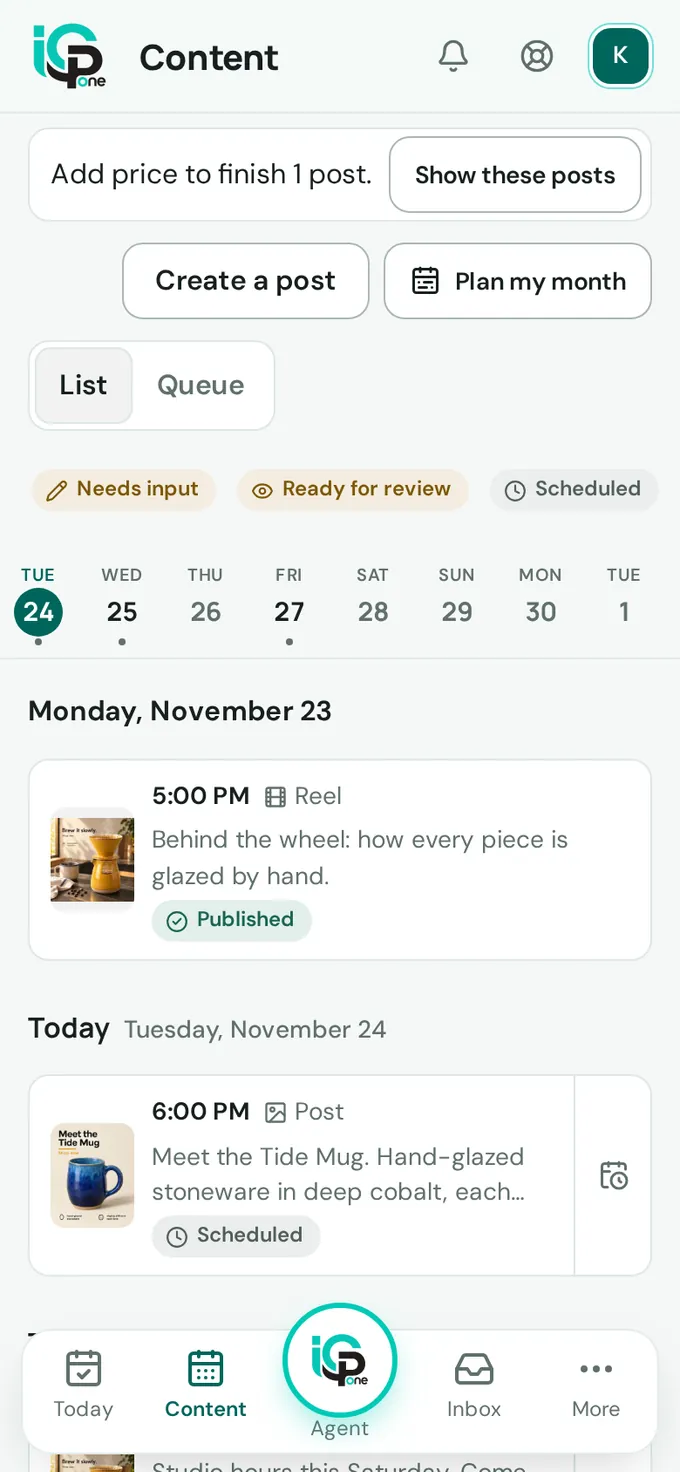
What the states mean
- Needs input: a fact is missing. Fill it in first.
- Ready for review: a draft waiting for your OK.
- Scheduled: it will go out at the time you chose.
- On hold: Instagram needs reconnecting.
- Published: Instagram confirmed the post.
- Couldn't publish: Instagram refused it. The post shows why.
Good to know
Approving a draft does not publish it. Scheduling and publishing each have their own confirmation.
You can schedule up to 75 days ahead. The time picker suggests a time based on how your earlier posts did, when there is enough data.
To clean up, choose “Manage drafts”: select drafts and delete them. Deleted drafts can be restored for 30 days.
Checklist
- Queue reviewed.
- Blanks filled in.
- Date and time checked on your business clock.
- Instagram connected.
Frequently asked questions
Can I change a post after scheduling it?
Yes. You can move or cancel it until it starts publishing.
What happens if Instagram is disconnected?
Scheduled posts are put on hold. Reconnect Instagram and they continue.
How do I know a post really went out?
IGP one checks the post's status with Instagram. It shows “Published” only after Instagram confirms it, with a link to the post.