
How to make reels and short videos
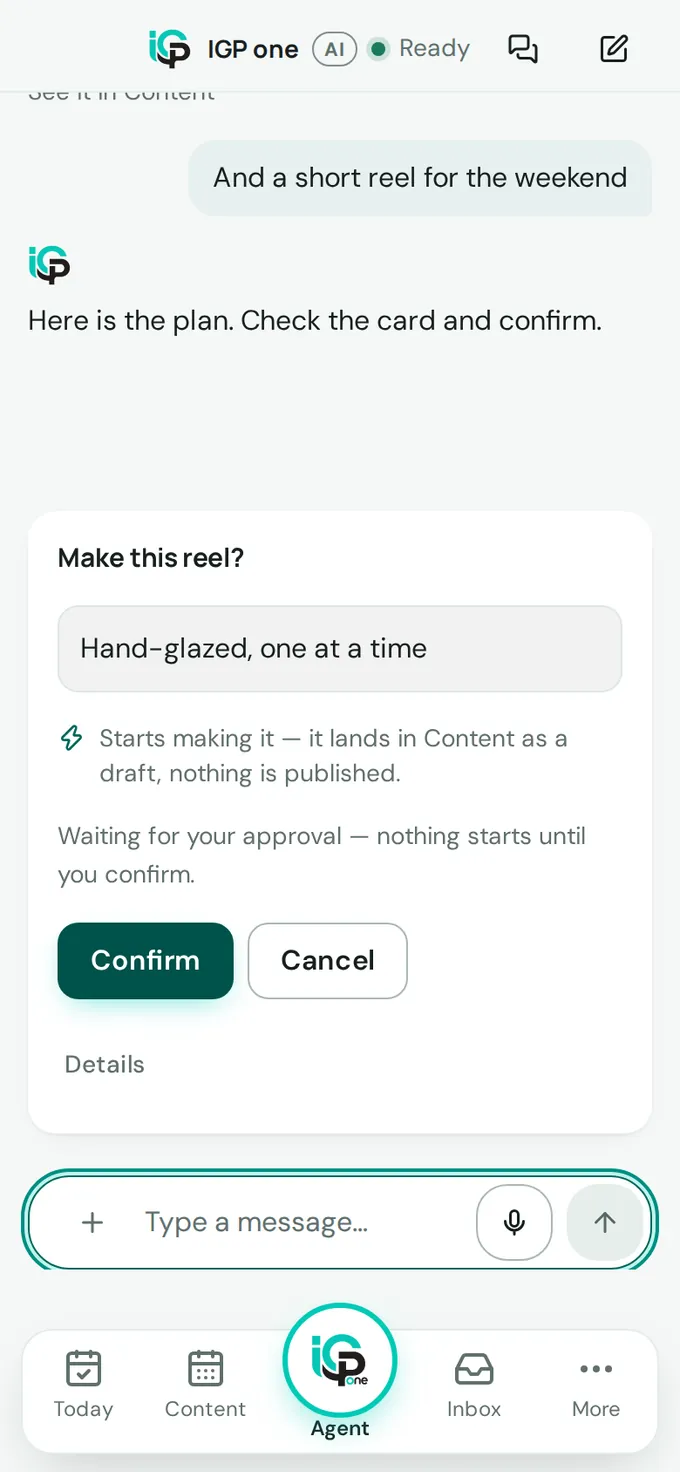
Ask for a reel, check the card with its lines and photos, and confirm. The reel renders in the background and lands in Content as a draft.
To make a reel, ask the agent and confirm the card. A Standard reel is built from your text, your photos and your brand's style, renders in about a minute and appears under “Content” as a draft. Nothing is posted until you approve it.
Steps
- In the chat, ask for a reel and say what it is about, for example an offer, a how-to or a product.
- Read the card “Make this reel?”: the lines on screen, the photos it will use and how many reels you have left this month.
- Select “Confirm”. The reel renders in the background.
- Open the draft under “Content”, watch it, and ask the agent for changes if needed.
- Approve it, then schedule or publish it like any other post.
Kinds of video
- Standard reel: text, photos and motion in your brand's style. Uses your plan's monthly reels.
- Product short: a short vertical video made from your real product photos.
- Cinematic reel: an AI video scene, paid with credits. The card shows the price and your balance, and credits are charged only when the video is ready.
Good to know
Reels inside your monthly allowance use no credits. On the Free plan, videos carry a small “Made with” mark.
If a reel cannot be made, nothing is charged. Ask the agent to try again.
Checklist
- Your own photos in the media library.
- Lines on the card read before confirming.
- Draft watched to the end.
- Approved before it is scheduled.
Frequently asked questions
How long does a reel take?
A Standard reel takes about a minute. A Cinematic reel takes a few minutes.
Do reels use credits?
Standard reels inside your plan's monthly allowance use none. A Cinematic reel uses credits, and the card shows the price first.
Is a reel published automatically?
No. It is saved as a draft and waits for your approval.